
Login
For Schools & Advertisers
Our graphic design team is here to make your ad stand out — clean, professional, and perfectly placed. Just follow the steps below to send us your logo and any supporting details to help us make your sponsorship look great.
ACCEPTED FORMATS: PDF, EPS, TIFF, JPG, PNG, Microsoft Word, or Publisher
RESOLUTION: 300–600 pixels per inch (ppi) is required for clear printing
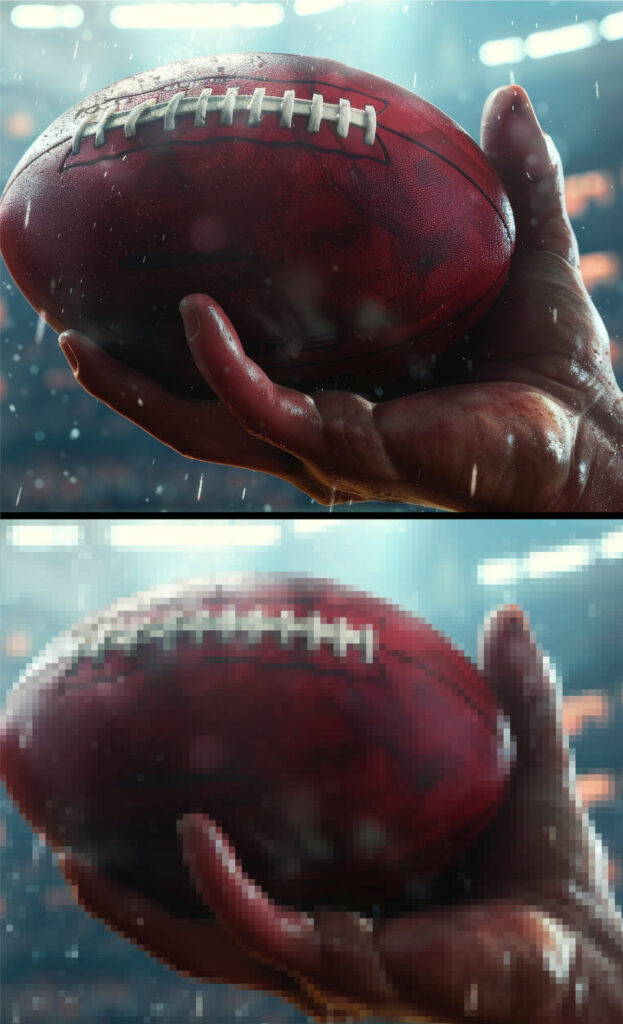
While not always immediately obvious on digital visuals such as computers and TV screens, low resolution data can dramatically effect the final results of a custom print job such as screen printing. The picture of the football shows an obvious example of resolution differences. However, even subtle differences can have an effect on the final print.
Image resolution refers to the detail and clarity of a digital image — measured in pixels per inch (ppi).
Print requires high resolution: 300–1200 ppi for sharp, professional quality
Web images are much lower: 72–96 ppi, and often not usable for print
Take a look at the example. When compared side-by-side, the difference is obvious. However, it can be easy to overlook resolution issues when you are dealing with small artwork.
A logo that looks great online may appear blurry or distorted in print unless it’s high resolution. To avoid unexpected quality loss, always be sure to provide a print-ready version of your file.
Again, formats like PDF, EPS, SVG, or high-res PNGs are better suited for printing than compressed web images. Ensuring proper resolution from the beginning saves time, money, and guarantees the final product looks its best.
If you’re unsure, we’re happy to help — just reach out!
By far the easiest method for submitting your logo is by using the Submit Your Logo Button. Below. However, if you have any issues with our online upload form, or prefer to use a different method, we also offer email and courier mail options.
If you’re mailing physical assets like business cards:
The Print Plug
Attn: Graphics Department
2603 Sundance Rd, Ste 101
Nampa, ID 83651